


Best DocSend alternatives in 2026: Top 7 options compared

Quick answer:
- Ideals is the top pick among DocSend alternatives for complex, high-stakes M&A due diligence
- DocSend suits fundraising decks and sales documents that need document analytics
- Digify suits teams that need document protection to stay in place after download
- Papermark suits startups that want an open-source tool with a free plan
- Dropbox suits general business file sharing and storage
- PandaDoc suits sales teams that send proposals and contracts for e-signature
- Onehub suits small teams that want client portals with a basic data room
Why teams are looking for DocSend alternatives
DocSend is part of Dropbox: Dropbox completed its acquisition of DocSend in March 2021. Since then, DocSend has kept adding features, including multimedia support, bulk folder imports, and streamlined permission controls. In 2024, it launched its Advanced Data Rooms plan, which now includes due diligence tracking and a data room audit log, and, since September 2026, a beta MCP server that lets AI apps access authorized DocSend content and engagement information.
Early fundraising is one of the most common use cases of DocSend, and founders use it for sharing pitch decks and tracking how investors read them. However, M&A teams looking for a virtual data room for the full due diligence process might want to explore DocSend competitors.
G2 reviewers also point to DocSend downsides, including limited free options, functionality limits, and app limitations. That is where a DocSend alternative can fit better as well.
This guide is for founders choosing a tool for investor updates, sales teams that share proposals, small teams that need simple document sharing, and dealmakers who need a full data room.
Here’s how the leading DocSend alternatives compare.
DocSend competitors at a glance
| Key highlights | Ideals | DocSend | Digify | Papermark | Dropbox | PandaDoc | Onehub |
| Average rating (sourced from G2, Capterra as of October 2026) | 4.75 | 4.55 | 4.7 | 4.5 | 4.45 | 4.6 | 4.4 |
| Transparent usage-based pricing | ✅ | ✅ | ✅ | ✅ | ✅ | ✅ | ✅ |
| Security rating (UpGuard) | 948/950 | 822/950 | N/A | N/A | 828/950 | 896/950 | 727/950 |
| Security track record | Zero breaches over nearly 20 years | Document URLs exposed to third-party security vendor subscribers in 2023 | No publicly disclosed breaches | No publicly disclosed breaches | – Dropbox Sign data breach exposed customer information in 2024- Dropbox credential theft exposed user email addresses in 2012 | No publicly disclosed breaches | No publicly disclosed breaches |
| Share files externally by link | ✅ | ✅ | ✅ | ✅ | ✅ | ✅ | ✅ |
| Granular access control | ✅8 levels | ✅4 levels | ✅6 levels | ✅2 levels | ✅3 levels | ✅3 levels | ✅7 levels |
| Screenshot prevention | ✅ | ✅ | ✅ | ✅ | ❌ | ❌ | ❌ |
| Custom session timeout | ✅ | ❌ | ❌ | ❌ | ✅ | ✅*for embedded signing via API | ✅ |
| Built-in document redaction | ✅ | ❌ | ❌ | ✅ | ❌ | ❌ | ❌ |
How each provider compares
1. Ideals
Best for: Complex M&A due diligence, buy-side and sell-side projects, and deals with many outside parties
G2 rating: 4.7/5 (870+ reviews)
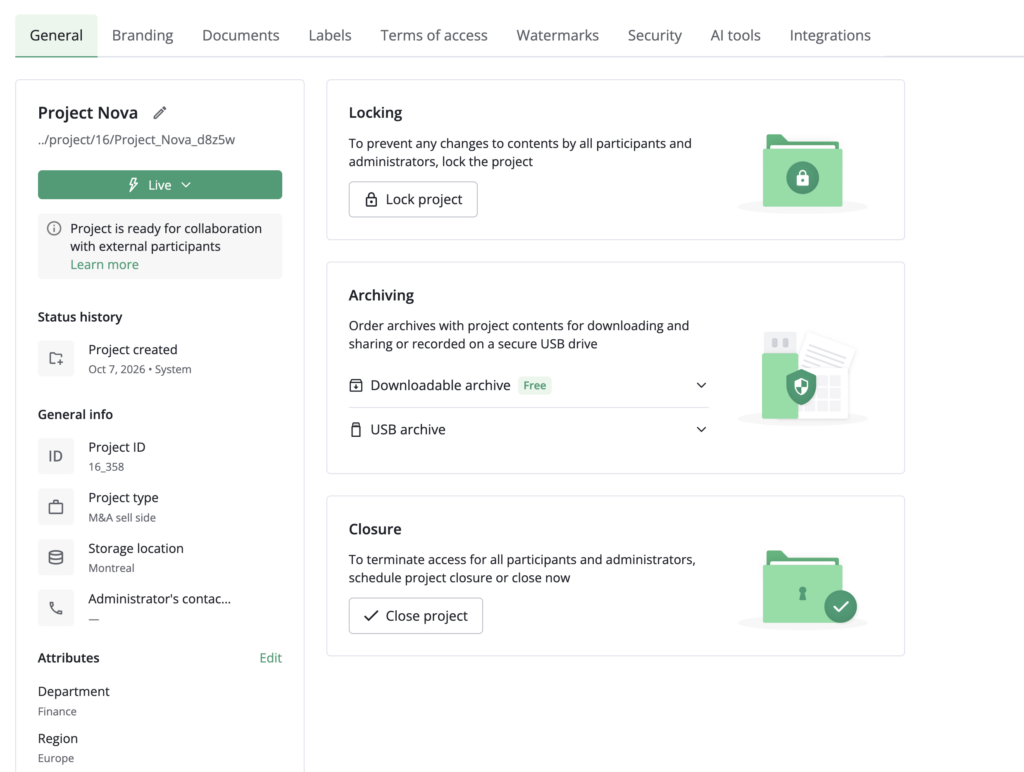
Ideals is a virtual data room built to follow the way due diligence runs. Administrators control access with eight document permission levels, run a shared due diligence checklist, and manage buyer questions in a Q&A module with customizable workflows. Security includes, but is not limited to, AI-powered redaction, dynamic watermarks, and screenshot prevention with fence view.
Ideals uses transparent, storage-based pricing with three plans, Core, Premier, and Enterprise, each offering unlimited users. Support runs 24/7 by email, chat, and phone, with 30-second chat responses on Premier and Enterprise. On G2, reviewers frequently point to ease of use and responsive customer support.
Potential limitation: On G2, some reviewers say the price can be high for smaller teams, despite the quality of the service provided.
2. DocSend
Best for: Fundraising decks, investor updates, and sales documents that need engagement analytics
G2 rating: 4.6/5 (580+ reviews)
DocSend began as a secure document-sharing and analytics tool that helped founders share pitch decks and understand how investors engaged with them. Fundraising remains a core use case, though the platform also supports sales, business development, and other document-sharing workflows. In 2024, it launched the Advanced Data Rooms plan, but DocSend still focuses primarily on secure sharing and engagement analytics rather than end-to-end deal workflow management.
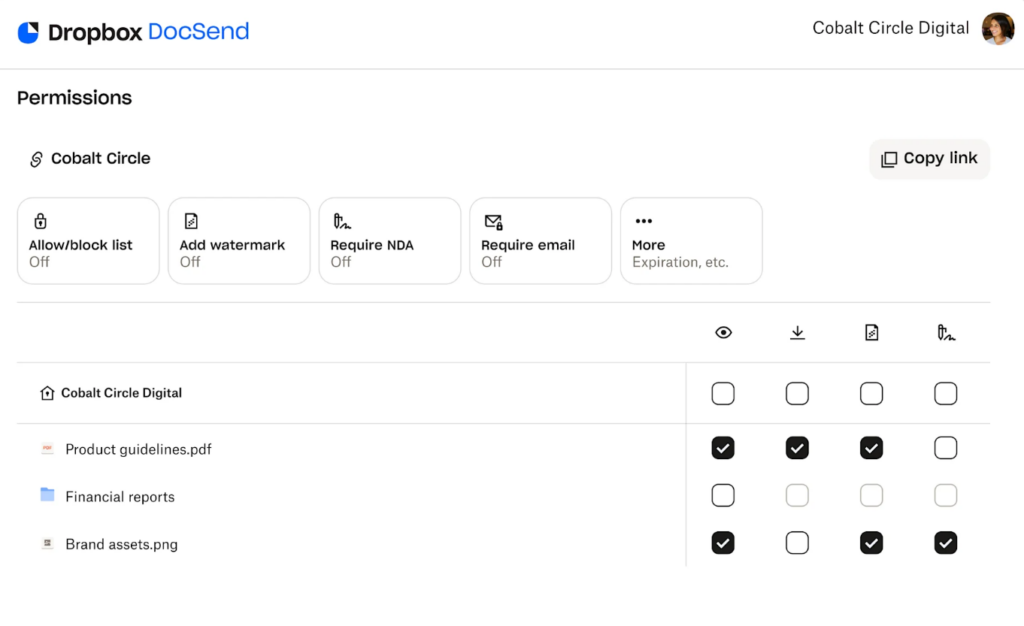
The Advanced plan adds lightweight data rooms (Spaces), dynamic watermarking, and NDAs. Advanced Data Rooms adds group visitor permissions, due diligence tracking, data-room audit logs, automatic file indexing, and data-room analytics. Each Space supports up to 2,000 assets on Advanced and 4,000 on Advanced Data Rooms. With annual billing, Personal starts at $10 per user per month, Advanced at $150 per month, and Advanced Data Rooms at $180 per month; both data-room plans include three users.
Potential limitation: G2 reviewers mention limited free options, functionality limits, and app limitations.
3. Digify
Best for: Teams that share sensitive documents with outside parties and want control after download
G2 rating: 4.6/5 (100+ reviews)
Digify combines secure document sharing with virtual data rooms for confidential transactions and collaboration. Its Persistent Protection After Download (PPAD) feature helps maintain access restrictions and activity tracking after files are downloaded. Standard document sharing works in the browser without additional software, although Digify’s PPAD DRM preview for data rooms requires a one-time viewer installation. Other features include dynamic watermarking, Screen Shield to discourage screen capture, page-level document analytics, and data rooms with Q&A and exportable audit logs.
Digify offers data residency options across nine regions: the US, Canada, Australia, UAE, Indonesia, India, Singapore, the UK, and Ireland. Digify offers tiered pricing with prices starting at $140.
Potential limitation: Some G2 reviewers mention slower load times, a dated interface, and somewhat clunky file management.
4. Papermark
Best for: Startups and small teams that want an open-source tool with a free plan
G2 rating: 4.5/5 (180+ reviews)
Papermark is an open-source document-sharing and virtual data room platform. It supports self-hosting, although production or commercial deployments require a commercial self-hosting license. All plans, including Free, offer unlimited visitors and page-by-page analytics, but analytics retention and document limits vary by plan.
The Data Rooms plan adds NDA agreements, dynamic watermarks, granular file-level permissions, and data room groups, with no file size limit. Papermark lists Pro at $29/month and Data Rooms at $119/month. Data Rooms Plus starts at $299/month, adding a Q&A module with permissions, file requests with permissions, and visitor audit logs. There’s also the Data Rooms Premium plan that adds AI redaction, whitelabeling, and dedicated support teams and costs $649/month.
Potential limitation: G2 reviewers flag Papermark’s notification issues, slow loading times, and unclear file management.
5. Dropbox
Best for: General business file sharing and storage
G2 rating: 4.4/5 (31,000+ reviews)
Dropbox is a general-purpose cloud storage and file-sharing platform. The company acquired DocSend in March 2021. Dropbox’s Standard and Advanced business plans include password-protected shared links, file transfers up to 100 GB, PDF editing and e-signatures, and team-sharing features such as groups and roles. Advanced adds audit logs with file event tracking, tiered admin management, and single sign-on (SSO).
Dropbox Standard costs $15 per user per month, while Advanced costs $24 per user per month. Advanced requires at least three users. Dropbox does not list a dedicated virtual data room plan, so teams handling M&A due diligence may need a purpose-built VDR for transaction-specific features and workflows.
Potential limitation: G2 reviewers cite tight storage limits requiring costly upgrades and syncing issues.
6. PandaDoc
Best for: Sales teams that send proposals, quotes, and contracts for e-signature
G2 rating: 4.7/5 (3,800+ reviews)
PandaDoc is a document workflow platform for creating, sharing, and signing proposals, quotes, and contracts. PandaDoc lists SOC 2 Type II assurance and GDPR-related compliance measures in its security documentation.
The pricing is tiered and comes in four plans: Free, Starter, Business, and Enterprise. The Free plan allows five documents per month. Starter costs $19 per seat per month, and Business costs $49 per seat per month, with both prices billed annually. Enterprise pricing is quote-based. The Business plan adds deal rooms (up to three published rooms), approval workflows, CRM integrations, custom branding, and a content library. Enterprise includes an unlimited number of deal rooms.
Potential limitation: G2 reviewers cite editing difficulties, formatting limitations, and limited practicality for small teams given the price.
7. Onehub
Best for: Small teams that want client portals and a basic data room
G2 rating: 4.2/5 (45 reviews)
Onehub supports both client portals and virtual data rooms. The Data Room Edition adds stealth mode, non-disclosure agreements, document watermarking, automatic indexing, and full audit trails. It includes five paid users, up to 1,000 total users, and unlimited cloud storage for $375 per month billed monthly, or $300 per month billed annually.
Every plan includes custom branding and role-based permissions, and Onehub offers a free 14-day trial.
Potential limitation: The small review base on G2 makes overall satisfaction harder to judge.
How to choose between these DocSend alternatives
The right pick depends on the job in front of you, not on which provider has the longest feature list. Use the table below as a starting point, then confirm current pricing with the provider of your choice.
| If your priority is… | Consider… | Why |
| Fundraising decks and investor updates | DocSend | Document analytics show how investors read your deck |
| A full data room for M&A due diligence | Ideals | Eight permission levels, a due diligence checklist, and Q&A workflows |
| Sales proposals, quotes, and contracts | PandaDoc | Proposals, e-signature, and recipient analytics on the Business plan |
| Light internal file sharing | Dropbox | Password-protected links, transfers up to 100 GB, and groups and roles |
| Sensitive files that leave your company | Digify | Protection that stays on files after download |
| An open-source tool with a free start | Papermark | Free plan, self-hosting subject to licensing, and page-by-page analytics |
| Client portals with a basic data room | Onehub | Data Room Edition with NDAs and watermarking from $300 a month, billed annually |
- Read more: For a wider view beyond this list, see our comparison of the best virtual data room providers in 2026.
FAQ
This guide also covers DocSend, Digify, Papermark, and Onehub for data rooms, while Dropbox and PandaDoc focus on general file sharing and contracts. The best fit depends on whether you need a full M&A data room or lighter document sharing.
Yes. Ideals is built for M&A due diligence, with eight permission levels, a due diligence checklist, and customizable workflows for Q&A. DocSend’s Advanced Data Rooms plan adds due diligence tracking, but the product centers on document sharing and analytics more than virtual data rooms.
The best DocSend alternative depends on your needs. Ideals fits M&A due diligence, Digify fits protected document sharing, Papermark fits open-source fundraising tools, Dropbox fits general file sharing, PandaDoc fits proposals, and Onehub fits client portals.
Dropbox owns DocSend. Dropbox completed the acquisition in March 2021.