


Best OneHub alternatives in 2026: Top 7 platforms compared

Quick answer
Ideals is the strongest option for M&A due diligence when teams need a purpose-built VDR with strong group-based permissions and deeper controls for complex, multi-party reviews.
OneHub combines general file sharing with a dedicated Data Room mode, while ShareFile offers a separate VDR plan alongside its broader client-collaboration products. DocSend fits fundraising and buyer outreach where campaign-level engagement tracking matters. Box, Dropbox, and Google Drive are primarily general-purpose cloud storage and file-sharing platforms, making them well-suited for routine document collaboration.
Why deal teams compare OneHub alternatives
OneHub is an independent provider that offers a separate Data Room Edition alongside its general file-sharing plans, so it sits between those two categories.
That model can work well for client portals, recurring external collaboration, and document-heavy projects. However, teams running M&A due diligence may need more specialized controls for reviewer permissions, transaction workflows, and complex multi-party review.
The alternatives also vary considerably in focus. Ideals is the most specialized option for M&A due diligence, with a purpose-built VDR model and deeper controls for complex reviewer groups. ShareFile extends further into client-facing document workflows, while DocSend emphasizes fundraising and buyer outreach. Box, Dropbox, and Google Drive primarily address general cloud storage, sharing, and collaboration.
For M&A teams, advisors, professional services firms, and other organizations handling confidential reviews, the right choice depends on the type of external collaboration, the required depth of control, and the expected data volume.
This guide compares six OneHub alternatives – Ideals, ShareFile, Box, Dropbox, DocSend, and Google Drive – across VDR depth, permission models, storage capacity, pricing, project controls, and suitability for different review workflows.
OneHub vs. 6 alternatives: comparison at a glance
| Key highlights | Ideals | OneHub | ShareFile | Box | Dropbox | DocSend | Google Drive |
| Average rating, G2 + Capterra (Sept 29, 2026) | 4.75 G2: 4.7 Capterra: 4.8 | 4.4 G2: 4.2 Capterra: 4.6 | 4.3 G2: 4.2 Capterra: 4.4 | 4.3 G2: 4.2 Capterra: 4.4 | 4.45 G2: 4.4 Capterra: 4.5 | 4.55 G2: 4.6 Capterra: 4.5 | 4.65 G2: 4.5 Capterra: 4.8 |
| Security rating by UpGuard (Sept 29, 2026) | 948/950 | 726/950 | 941/950 | 906/950 | 830/950 | 810/950 | 657/950 |
| Transparent pricing model | ✓ | ✓ | ✓ | ✓ | ✓ | ✓ | ✓ |
| Granular access control | ✓ 8 levels | ✓ 7 levels | ✓ 7 levels | ✓ 6 levels | ✓ 3 levels | ✓ 4 levels | ✓ 6 levels |
| Share files externally by link | ✓ | ✓ | ✓ | ✓ | ✓ | ✓ | ✓ |
| Upload from external storage | ✓ Dropbox, OneDrive SharePoint Google Drive | Not confirmed | ✓ SharePoint OneDrive Dropbox Box Google Drive | ✓ Migration | ✓ Google Drive OneDrive | Not confirmed | Not confirmed |
| Project controls (pause and lock modes) | ✓ | Not confirmed | ✓ | Not confirmed | Not confirmed | Not confirmed | Not confirmed |
| Screenshot protection | ✓ | Not confirmed | Not confirmed | Not confirmed | Not confirmed | ✓ | Not confirmed |
| Custom session timeout | ✓ | ✓ | ✓ | ✓ | ✓ | Not confirmed | ✓ |
Read more: For a broader comparison of purpose-built platforms, see our guide to the best virtual data rooms.
Ideals
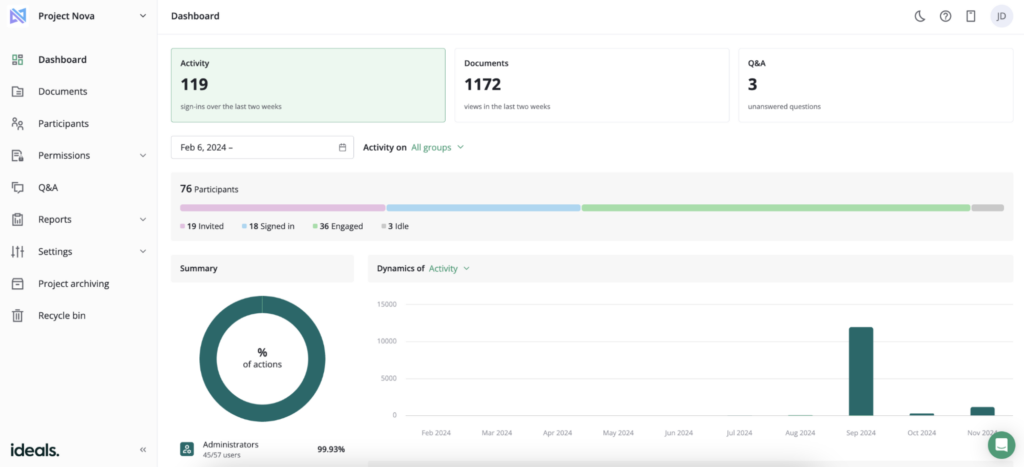
Ideals is better suited to complex data rooms than OneHub and the general file-sharing platforms. Its main advantage is a permission model that gives administrators more control over different reviewer groups without relying mainly on fixed collaborator roles.
Key differentiators include:
- Group-based access controls. Ideals provides eight permission levels that can be assigned to user groups and adjusted at the folder or file level, making access more flexible and easier to manage than permissions tied to predefined roles.
- Unlimited uploads. Ideals does not limit the number of uploaded files or individual file size, which is useful for document-heavy diligence.
- Flexible billing for sell-side projects. Premier M&A sell-side projects can remain in a preparation phase without triggering billing until external collaboration begins.
Ideals has usage-based (storage-based) pricing across Core, Premier, and Enterprise plans. Core is designed for smaller projects and includes up to 2 GB of storage, while higher tiers support larger data rooms and more demanding review requirements.
For smaller projects, the 2 GB included with Core is more restrictive than OneHub’s storage capacity, so teams expecting a larger document set may need a higher Ideals plan even if the review itself is relatively simple.
OneHub
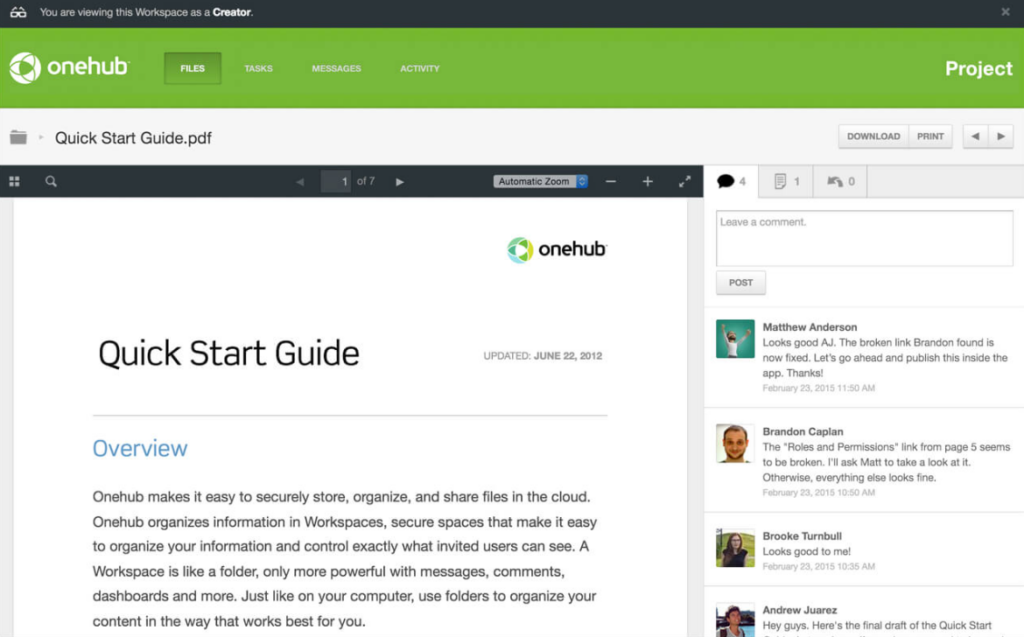
OneHub combines general file sharing with an optional Data Room mode. Teams can use separate workspaces for everyday document sharing or confidential review within the same account.
Key differentiators include:
- Switchable workspace modes. Administrators can set each workspace for either ordinary file sharing or dedicated Data Room use.
- Large multi-room allowance. The Data Room Edition supports up to 200 workspaces and 1,000 total users, which can suit teams running several separate review environments under one subscription.
- High storage capacity. OneHub includes 1 TB of cloud storage on its entry plan, while higher-tier plans include unlimited storage. This makes it well-suited to large, document-heavy data rooms.
OneHub’s Data Room Edition costs $375 per month when billed monthly or $300 per month when billed annually. The plan includes five paid users and unlimited storage.
OneHub lacks some transaction-specific diligence workflows, a dedicated Q&A module, and granular multi-level configurations found in specialized VDRs. However, its client portal functionality makes it a strong fit for recurring client document exchange and ongoing external collaboration.
ShareFile
ShareFile supports client-facing collaboration, secure document exchange, and virtual data room use on a single platform. It fits teams that need more workflow structure than general file sharing without moving to a fully specialized VDR.
Key differentiators include:
- Broad cloud-storage connectors. ShareFile connects with Box, Dropbox, Google Drive, OneDrive, OneDrive for Business, and SharePoint Online. This gives teams more options for bringing existing document sets into the review workflow without relying on manual transfers.
- AI document validation. When files are submitted via a request, ShareFile can verify that the uploaded document matches the request and flag any mismatches before submission.
- AI-assisted request setup. ShareFile can generate request-list items based on the review type, industry, and user role, reducing the manual effort required for document collection.
As of September 2026, ShareFile’s Virtual Data Room costs $77 per user per month, or $69.30 per user per month when billed annually, with a five-user minimum. Each license includes 1 GB of VDR storage.
The main limitation is storage capacity. Because VDR storage scales with licenses, large document sets may require additional seats or capacity, whereas comparable VDR providers offer more flexible storage options.
ShareFile also has a documented history of security vulnerabilities affecting its Storage Zones Controller. In 2023, a critical Citrix ShareFile flaw, CVE-2023-24489, was exploited in the wild, although ShareFile said there was no known data theft from that incident, according to BleepingComputer.
In 2026, researchers disclosed two additional critical ShareFile flaws that could be chained to enable unauthenticated remote code execution, and Progress later ordered some customers to shut down Storage Zone Controllers while it addressed another high-severity zero-day. Progress said it found no evidence of unauthorized access to customer accounts or data, according to CybersecurityDive.
Box
Box is an enterprise content-storage and file-sharing platform. It supports basic confidential file sharing, but it is far less suitable than a dedicated VDR for structured due diligence, multi-party review, and transaction-specific controls.
- Enterprise content governance. Box Governance automates retention rules and disposition workflows and supports legal holds.
- Broad integrations. Higher-tier Box plans support 1,500+ integrations with business systems.
As of September 2026, with annual billing, Box Business costs €13.50 per user per month. Business Plus costs €22.50, Enterprise costs €31.50, and Enterprise Plus costs €45 per user per month. All plans require at least three users.
The main limitation for a data room use case is that Box is built around enterprise content management rather than transaction-specific diligence. Its permissions are largely role-based, and it lacks dedicated due diligence workflows and a purpose-built Q&A module, making it less suitable than a traditional VDR.
Dropbox
Dropbox is built for cloud storage and file sharing. It handles large volumes of files well, but lacks the transaction-specific controls and diligence workflows expected of a dedicated VDR.
Its distinctive strengths include:
- Large team storage pools. Dropbox Advanced starts with 15 TB of shared team storage, based on 5 TB per active license with a three-license minimum.
- Advanced team encryption. Higher plans use team-specific encryption keys with automatic annual key rotation, adding centralized control over protected team content.
As of September 2026, Dropbox Standard, with annual billing, costs $15 per user per month and includes 3 TB of shared team storage. Dropbox Advanced costs $24 per user per month, requires at least three users, and starts with 15 TB of shared team storage.
The main limitation is that Dropbox lacks the control layer expected from a dedicated VDR. Its sharing model is built around broad user roles. Data-room-grade features such as project-wide locking, screenshot protection, and fine-grained reviewer permissions are either limited or absent. This makes Dropbox better suited to high-volume storage and file exchange.
DocSend
DocSend is a lightweight VDR centered on document engagement. It is particularly useful for fundraising and deal processes where teams want to see how individual recipients interact with shared materials.
Its distinctive strengths include:
- Live document updates. DocSend lets teams replace a shared file without changing its link or losing engagement tracking.
- Campaign-link tracking. DocSend supports campaign links and mail-merge workflows that preserve recipient-level engagement data, which is useful for broad investor or buyer outreach before deeper diligence
As of September 2026, with annual billing, DocSend Standard costs $30 per user per month. Advanced costs $150 per month for three users, while Advanced Data Rooms costs $180 per month for three users. The latter increases room capacity to 4,000 assets, while individual uploads remain limited to 2 GB.
The main limitation of DocSend is scale and administrative depth. Asset and file-size limits can constrain document-heavy transactions, while its permissions and room controls are less extensive than those of a traditional VDR. DocSend fits fundraising and lighter deal reviews better than large, highly segmented due diligence projects.
Google Drive
Google Drive is a collaboration and cloud-storage platform. It can support simple confidential sharing, but its access model and project controls are too general for complex due diligence.
Its key differentiators:
- Native Workspace editing. Teams can co-edit Docs, Sheets, and Slides directly in Drive, with comments, suggestions, and version history built into the same environment.
- Gemini across Drive content. On eligible plans, Gemini can summarize files and folders, retrieve information in natural language, and synthesize answers across multiple Drive sources. Gemini can suggest file moves and folder structures based on content and existing organization patterns, reducing manual cleanup in large repositories.
As of September 2026, Google Workspace Starter costs $8.40 per user per month, Standard costs $16.80 per user per month, Plus costs $26.40 per user per month, and Enterprise uses custom pricing. These plans include 30 GB, 2 TB, and 5 TB of pooled storage per user, respectively.
Google Drive is well-suited for everyday document collaboration, co-editing, cloud storage, and routine external sharing. It is not a purpose-built virtual data room as it lacks VDR-grade reviewer segmentation.
How to choose a OneHub alternative
Choose a OneHub alternative based on what the data room needs to support beyond secure document access. The strongest fit depends on whether the priority is M&A due diligence, recurring external collaboration, general file sharing, or investor outreach.
Ideals focuses on purpose-built VDR use for M&A due diligence, while OneHub and ShareFile are better suited to client-facing document workflows. Box, Dropbox, and Google Drive center on general cloud storage and file sharing, while DocSend is more oriented toward fundraising and buyer outreach.
| Use case | Provider to consider | Decision logic |
| M&A due diligence | Ideals | Fits transactions that need flexible group-based permissions, stronger data-room controls, and room structures that can scale from smaller projects to complex multi-party reviews. |
| Client portals and recurring external collaboration | OneHub or ShareFile | Both suit teams that want ordinary file sharing and dedicated data room workspaces in the same account. |
| General business storage and document collaboration | Box, Dropbox, or Google Drive | Fits teams that primarily need straightforward cloud storage, file sharing, and document collaboration across internal and external users. |
| Fundraising and buyer outreach | DocSend | Fits teams that distribute deal materials broadly and want campaign-link tracking and engagement data before or alongside lighter/preliminary diligence. |
Bottom line
Data room requirements become more demanding as reviewer groups, document sensitivity, and transaction complexity increase. Dedicated VDRs address that depth, while lighter platforms can be sufficient for recurring client collaboration, routine file sharing, or smaller external reviews.
The right OneHub alternative should reflect the level of control the project actually requires. Matching the platform to the review structure helps avoid weak permission models, unnecessary storage costs, and manual workarounds later in the process.
FAQ
Ideals is a dedicated VDR alternative for teams that conduct M&A due diligence. Its permission model offers eight access levels that administrators can assign to user groups and adjust at the folder or file level, giving them more control over complex, multi-party reviews.
OneHub’s Data Room Edition costs $375 per month, or $300 per month when billed annually, and includes five paid users and unlimited storage. Dedicated VDRs such as Ideals can use storage-based pricing, so the cost comparison depends on data volume, reviewer requirements, and the level of VDR control needed.
OneHub does not currently advertise AI-specific capabilities as part of its Data Room Edition. Its documented VDR features focus on controls such as automatic indexing, watermarking, NDAs, stealth mode, and audit trails. Platforms such as Ideals now offer AI-assisted redaction, translation, document search, and integrations with tools such as ChatGPT, Claude, and Microsoft Copilot.
OneHub can support less-complex M&A due diligence where secure document sharing, high storage capacity, and participant confidentiality are the primary requirements. For reviews involving more complex permissions, dedicated Q&A, or transaction-specific workflows, a purpose-built VDR offers more robust functionality.
The closest OneHub alternative for client portals is ShareFile. Both OneHub and ShareFile fit recurring client-facing document workflows, but they emphasize different needs. OneHub combines client portals with configurable workspaces and high storage capacity, while ShareFile adds more structured document intake and AI-assisted request workflows.