Request sent. We will email your data room access link shortly. Your Account Manager will contact you to discuss your project.

IDEALS MCP

Your favorite AI meets Ideals VDR

Run your entire project securely with Claude, ChatGPT, or Copilot from due diligence to signing

How do AI tools work

with Ideals?
The Ideals Model Context Protocol (MCP) server creates 
a secure bridge between your project and AI tools, enabling them to act directly inside Ideals – while your 
data always stays fully protected

Work at the speed
of conversation

Connect the AI tools your team already uses and run your deal without leaving the chat

Ask instead of click

Describe the task you want to perform and AI acts directly inside the data room on your behalf

Cut days into minutes

Set up folders, review documents, process Q&A, and track activity – in a fraction of the time 

Stay in control

The AI works within your existing permissions, with every action captured in a full audit trail

Turn prompts into
deal momentum

Execute every step of the deal cycle inside your data room, from both sides of the M&A table

AI assistant · Claude
Project Ideon · Connected
C
Claude · Ideals VDR
Connected to Project Ideon
Active

Turn prompts into
 deal momentum

Execute every step of the M&A cycle inside your data room, from both sides of the deal table

Set up the folder structure

Prompt: “Create a folder index for a €200M mid-market manufacturing sell-side M&A”


Spot what’s missing

Prompt: “Check whether a VDR is complete, benchmarking it against best practices”


Configure bidder access

Prompt: “Add 4 groups for shortlisted bidders and confirm their access to the Information Memorandum.pdf”


Monitor bidder engagement 

Prompt: “Pull 7-day activity data for all  bidders – who viewed the most files and logged in most frequently?”


Manage and respond to the Q&A

Prompt: “Identify the 5 most commercially sensitive Q&A questions and flag them for the management team to answer first”


Keep the data room clean

Prompt: “Find all empty folders and identify any duplicate files by name and size”

Assess strategic synergy instantly

Prompt: “Compare the CIM against the attached acquisition strategy and highlight areas of strategic fit and conflict ”


Map the data room on day one

Prompt: “Summarise project folders structure and match it with the attached DD checklist”


Search and summarize documents

Prompt: “Find all documents mentioning ‘indemnification’ across the project and summarise key points from each of them”


Track what’s been added

Prompt: “Show all files uploaded in the last 7 days and whether anyone from my team has accessed them”


Ask the right questions

Prompt: “The FY24 audit has a qualification on revenue recognition – draft a precise Q&A question that gets to the bottom of it”


Compile diligence findings

Prompt: “Draft a list of red and yellow flags based on Q&A threads and notes to files”

Up and running
in 3 simple steps

Enable once and your team can start working through
their preferred AI tool immediately
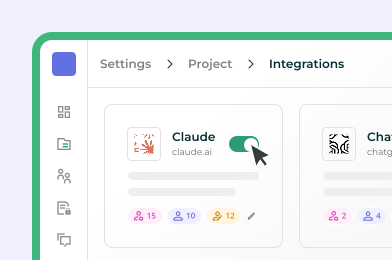
1. Enable AI tool in Ideals

Go to Settings. Integrations and enable your preferred AI tool for relevant user groups.
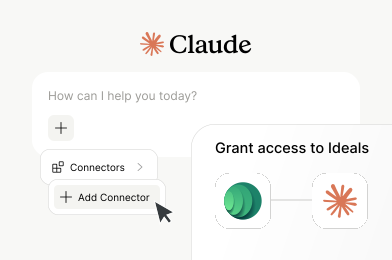
2. Connect your AI tool

Open your AI tool, add Ideals as a connector, and your existing access rights carry over automatically
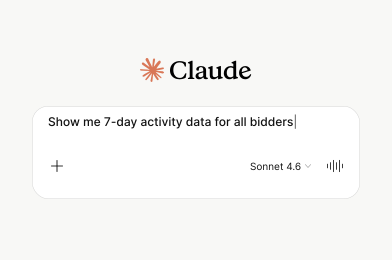
3. Start prompting

Write what you need in your own words and AI handles it directly within your data room

Frequently Asked Questions

Still have a question? Contact us

MCP is an open standard that securely connects AI tools to your Ideals data room. It allows AI to search, analyse, and take action directly inside the data room.

No. MCP is built into Ideals as a secure connectivity layer. Your data room remains the foundation for storage, permissions, and audit – MCP simply enables AI to work within it.


No. Your deal data is not used to train Ideals or third-party models. All interactions are limited to your data room and governed by your permissions.


AI operates within your existing access rights. It can only see and act on what you’re already authorised to access, with no additional permissions required.


You can structure data rooms, manage access, search and summarise documents, handle Q&A, track activity, and run diligence workflows – all through natural language prompts.


Without MCP, teams often upload sensitive documents into external tools – creating security risks and no audit trail. With MCP, AI connects directly to your data room, and every action is tracked and governed.

Just a few clicks. Enable your preferred AI tool in Ideals settings, then open Claude or ChatGPT and add Ideals as a connector – no technical setup or training required.