


Best ShareFile alternatives in 2026: Top 7 options compared

Quick answer:
- Ideals is the top pick among ShareFile alternatives for complex, high-stakes M&A due diligence because Ideals is built as a data room rather than a general file-storage tool
- ShareFile suits accounting, legal, and healthcare teams that need secure storage for client files
- Box suits larger companies that need admin controls and compliance features
- Dropbox suits general business file sharing with simple setup
- Google Drive suits teams that already work in Google Workspace
- Onehub suits teams that want client portals with virtual data room functionality
- DocSend suits fundraising and sales teams that need document sharing and page-level engagement analytics
Why teams are looking for ShareFile alternatives
Progress Software acquired ShareFile from Cloud Software Group for $875 million in 2024. Before Cloud Software Group ownership, ShareFile was also part of Citrix, and many guides still call the product Citrix ShareFile. That ownership change may prompt some customers to reassess the product, its support arrangements, and its long-term fit.
Three other factors shape the search. A 2023 flaw in the customer-managed storage zones controller (CVE-2023-24489) landed on the CISA Known Exploited Vulnerabilities catalog. ShareFile also charges per user on every plan, which adds up for large teams, and its Virtual Data Room plan requires at least five users, which may be more than a small deal team needs. Finally, G2 reviewers flag slow software performance and a steep learning curve.
This guide is for accounting, legal, and healthcare teams that share client files, companies with 250-1,000 employees choosing a file-sharing platform, and dealmakers who need a true data room.
Here’s how these common ShareFile alternatives compare on the core features and pricing approaches.
ShareFile competitors compared
The table shows how each provider handles pricing, data room features, and user ratings.
| Key highlights | Ideals | ShareFile | Box | Dropbox | Google Drive | Onehub | DocSend |
| Average rating (sourced from G2, Capterra as of October 2026) | 4.75 | 4.2 | 4.2 | 4.4 | 4.6 | 4.2 | 4.6 |
| Transparent usage-based pricing | ✅ | ✅ | ✅ | ✅ | ✅ | ✅ | ✅ |
| Security rating (UpGuard) | 948/950 | 941/950 | 907/950 | 830/950 | 657/950 | 727/950 | 822/950 |
| Security track record | Zero breaches over nearly 20 years | ShareFile security flaw (CVE-2023-24489) came under active attack in 2023 | No publicly disclosed breaches | – Dropbox Sign data breach exposed customer information in 2024- Dropbox credential theft exposed user email addresses in 2012 | No publicly disclosed breaches | No publicly disclosed breaches | Document URLs exposed to third-party security vendor subscribers in 2023 |
| Share files externally by link | ✅ | ✅ | ✅ | ✅ | ✅ | ✅ | ✅ |
| Granular access control | ✅8 levels | ✅5 levels | ✅7 levels | ✅3 levels | ✅4 levels | ✅7 levels | ✅4 levels |
| Screenshot prevention with Fence view | ✅ | ❌ | ❌ | ❌ | ❌ | ❌ | ✅ |
| Custom session timeout | ✅ | ✅ | ✅ | ✅ | ✅ | ✅ | ❌ |
*Google Drive’s G2 and Capterra figures come from the Google Workspace listing, which includes Drive.
1. Ideals
Best for: Complex M&A due diligence, fundraising, and real estate or life sciences deals with many outside parties.
G2 rating: 4.7/5 (860+ reviews)
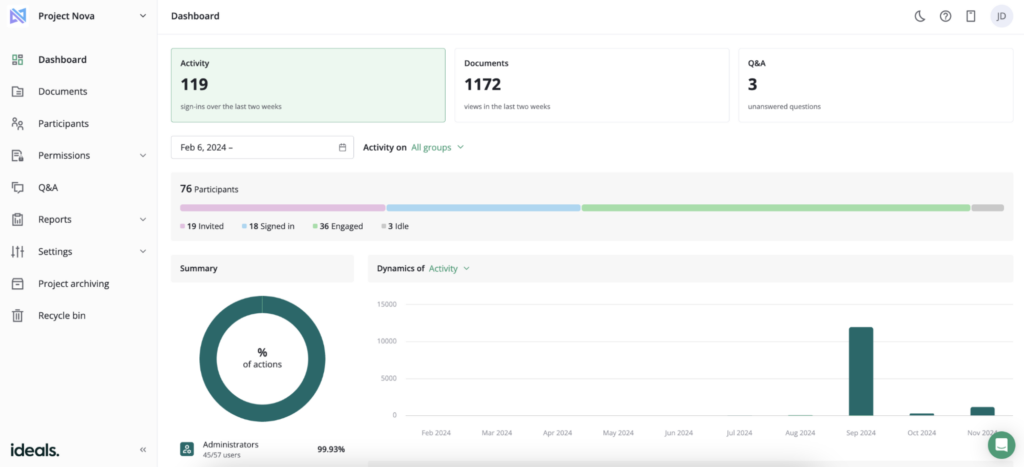
Ideals is a data room built around the deal, so its tools follow the way due diligence runs. Administrators set access across eight permission levels, run a shared due diligence checklist, and manage buyer questions in a Q&A module with customizable workflows. Security includes AI-powered redaction, dynamic watermarks, screenshot prevention with fence view, and other features. Ideals VDR is ISO/IEC 27001-certified and has SOC 2 assurance reporting.
Ideals also has a transparent pricing approach. It offers three plans, Core, Premier, and Enterprise, with storage-based pricing and unlimited users on each. Support runs 24/7 by email, chat, and phone, with chat responses in 60 seconds on Core and 30 seconds on Premier and Enterprise.
Potential limitation: Some G2 reviewers note the lack of user group migration capabilities between different projects, while others mention cost might be on the higher end for small teams.
2. ShareFile
Best for: Accounting, legal, and healthcare teams that need secure storage for client files
G2 rating: 4.2/5 (1,400+ reviews)
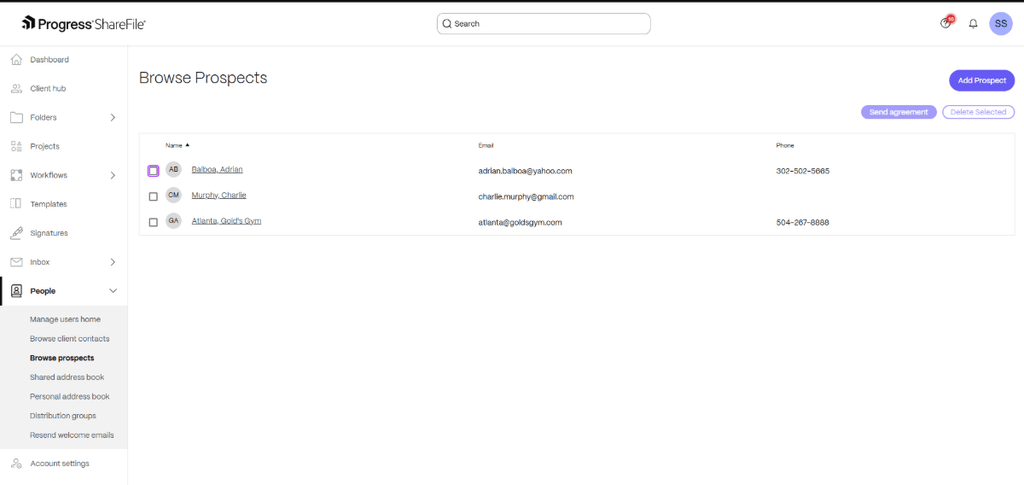
Progress Software Corporation completed its acquisition of ShareFile from Cloud Software Group in October 2024, so ShareFile is now part of the Progress product portfolio.
ShareFile’s plans page lists four tiers, all priced per user:
- Advanced costs $16.50 per user per month billed annually, or $18.15 billed monthly.
- Premium costs $26.00 billed annually, or $28.59 billed monthly.
- Enterprise costs $35.00 billed annually, or $42.00 billed monthly.
- Virtual Data Room costs $69.30 billed annually, or $77.00 billed monthly.
The first three tiers require at least three users, and the Data Room plan requires five. Premium adds enhanced client portals, e-signatures, workflow automation, and support for HIPAA, FINRA, and SEC compliance. The Virtual Data Room plan adds Q&A, click trails, and NDA enforcement.
On security history, CVE-2023-24489 affected customer-managed ShareFile storage zone controllers before version 5.11.24. The National Vulnerability Database records the flaw, and CISA added it to its Known Exploited Vulnerabilities catalog in August 2023. The entry covers customer-managed storage zone controllers, so it matters most if you host your own storage zone.
Potential limitation: Some G2 reviewers cite pricing for small teams, slow performance, and a steep learning curve for advanced features.
3. Box
Best for: Larger organizations that need admin controls, compliance support, and content management across many teams
G2 rating: 4.2/5 (5,200+ reviews)
Among ShareFile competitors, Box is built for enterprise content management across teams. Its Business plans offer unlimited storage and no maximum user count. Business Plus and higher plans include unlimited external collaborators, while the Business plan charges for them.
Box’s Business and Business Plus plans list SOC 1, SOC 2, and SOC 3 compliance support; Enterprise and higher add HIPAA and FedRAMP Moderate. Business plans also include document watermarking and more than 1,500 enterprise app integrations.
Business plans start at $15 per user/month billed annually ($20 monthly) for Business, with a three-user minimum. Box also offers Business Starter for $5 per user per month billed annually ($7 monthly), but that plan is limited to 10 users and 100 GB of storage.
Potential limitation: G2 reviewers’ most frequent criticisms of Box are slow performance and price.
4. Dropbox
Best for: General business file sharing with simple setup and sync across devices
G2 rating: 4.4/5 (31,400+ reviews)
Dropbox keeps file sharing simple across devices. Both team plans include password-protected links, file transfers up to 100 GB, PDF editing, and file branding and protection features. Advanced adds audit logs with file event tracking and single sign-on (SSO). It also extends the file recovery window to one year, compared with 180 days on Standard, giving teams more time to recover deleted files.
Dropbox also owns DocSend, a separate product for secure document sharing and engagement analytics, covered below. Standard costs $15 per user per month, while Advanced costs $24 per user per month. Enterprise pricing is customized after a sales conversation.
Potential limitation: G2 reviewers most often flag price and tight storage limits.
5. Google Drive
Best for: Teams already working in Google Workspace that need everyday file sharing
G2 rating: 4.6/5 (48,000+ reviews, Google Workspace listing)
Google Drive is included in Google Workspace plans, making it a natural fit for teams that already use Google’s productivity tools. Storage is pooled across the organization, with each user license contributing 30 GB on Business Starter, 2 TB on Business Standard, and 5 TB on Business Plus. Enterprise storage depends on the edition: Enterprise Starter includes 1 TB per user, while Enterprise Standard and Plus include 5 TB. Enterprise plans also offer advanced controls such as data loss prevention (DLP), context-aware access, and AI classification for Google Drive.
Pricing is per user through Google Workspace subscriptions, which bundle Drive with business email, video meetings, and administrative controls. Business Starter, Standard, and Plus support up to 300 users each. Organizations that need more users must choose Enterprise, with pricing available through Google’s sales team.
Potential limitation: G2 reviewers’ top complaints about Google Workspace are missing and limited features.
6. Onehub
Best for: Small teams that want client portals and a basic data room at a flat monthly price
G2 rating: 4.2/5 (45 reviews)
Onehub supports both client portals and virtual data rooms. Its Data Room Edition adds features for confidential transactions, including stealth mode, non-disclosure agreements, document watermarking, automatic indexing, and full audit trails. Viewers, printers, and downloaders invited at the workspace, folder, or file level are free, provided the account stays within its total user limit. This can help when a deal involves more external reviewers than internal team members.
Standard costs $15 per paid user per month, or $12.50 with annual billing. Advanced costs $25 per paid user per month, or $20 per month with annual billing. Data Room Edition costs $375 per month, or $300 per month with annual billing, and includes five paid users. All plans include a 14-day free trial.
Potential limitation: Less broad review base on G2 compared to alternatives.
7. DocSend
Best for: Fundraising, investor updates, and proposals that need page-level engagement analytics
G2 rating: 4.6/5 (580+ reviews)
DocSend, part of Dropbox, uses secure sharing links and document analytics to show how recipients engage with shared files, including which pages each viewer reads. Its Advanced plan adds lightweight data rooms, dynamic watermarking, and NDAs.
Advanced Data Rooms adds a data room audit log, due diligence tracking, group visitor permissions, and automatic file indexing. Personal costs $10 per user per month, Advanced costs $150 per month for three included users, and Advanced Data Rooms costs $180 per month for three included users.
Potential limitation: G2 reviewers say DocSend gets expensive when many seats are needed, and some cite limited customization options.
How to choose between these ShareFile alternatives
The choice depends on what you need a ShareFile alternative for.
| If your priority is… | Consider… | Why |
| Client file sync for accounting, legal, or healthcare work | ShareFile | Client portals, e-signatures, document workflows, and support for HIPAA, FINRA, and SEC requirements on Premium and above |
| General business file sharing | Dropbox | Familiar cross-device sync, password-protected links, and transfers up to 100 GB on Standard and Advanced |
| A team already on Google tools | Google Drive | Drive comes with every Workspace plan, with pooled storage from 30 GB to 5 TB per user |
| A company with 250-1,000 employees | Box | No maximum user count on Business and higher plans, unlimited storage, and compliance support on Enterprise |
| Client portals and a basic data room at a flat price | Onehub | Data Room Edition at $375 per month with five paid users |
| Fundraising decks and proposals with analytics | DocSend | Page-level analytics, with data rooms from $150 per month |
| A real deal room with several bidders and due diligence | Ideals | Eight permission levels, a due diligence checklist, and Q&A workflows |
- Read more: Want a wider view beyond file-sharing tools? See our guide to the best virtual data room providers for pricing, features, and use cases.
FAQ
Box and Dropbox suit file sharing at this size. Box lists plans with no maximum user count, and Dropbox offers Enterprise with custom user numbers. Google Workspace Business Starter, Standard, and Plus plans cap at 300 licensed users, so larger teams need its Enterprise tier. For deals, Ideals data room is a strong option when the team needs M&A-specific Q&A, permissions, and audit trails.
The best choice depends on your needs. Ideals fits M&A due diligence, Box fits larger companies, Dropbox fits general sharing, Google Drive fits Google Workspace teams, Onehub fits client portals, and DocSend fits fundraising analytics. ShareFile itself still suits accounting, legal, and healthcare client work.
ShareFile’s plans page lists four paid plans with free trials and no permanent free plan. Box offers a free Individual plan with 10 GB of storage for personal use, and there’s also a free version of Google Drive for personal use. However, neither is built for confidential deals, which may call for a dedicated data room with transaction-specific access controls and reporting.
ShareFile lists four per-user tiers. Prices run from $16.50 per user per month billed annually for Advanced to $69.30 for the Virtual Data Room plan, which has a five-user minimum. Monthly billing runs from $18.15 to $77.00 per user.
Progress Software Corporation owns ShareFile. It completed the purchase from Cloud Software Group in October 2024. Older materials may still mention Citrix ShareFile, as ShareFile was part of Citrix before Cloud Software Group.